LDM printers
FDM stands for liquid deposition modeling and refers to 3D-printing with semi-viscous to viscous materials such as clay or food pastes.
Safety Rules for Lutum 4 Clay Printer
- Keep the work area clean and free of any debris or obstacles, which can cause accidents or affect the performance of the printer.
- Only use clay that is compatible with the printer (low levels of grog), and follow the instructions for loading and unloading the clay.
- Check the air pressure gauge and ensure that the pressure does not exceed the recommended limit of 4 bars. Never attempt to increase the pressure beyond the recommended limit.
- Never touch the printer's moving parts or attempt to reach inside the printer while it is in operation. This can cause injury and damage to the printer and you.
- When finished using the Lutum 4 clay printer, turn it off and disconnect the pneumatic tube.
Instructions for Lutum 4 printer
Please only use this printer after talking to Makerspace staff.
- How to use the Lutum Clay Printer at A-huset, LTH (PDF, 16.3 MB, new tab)
- FAQs on VormVrij's Lutum page (scroll down to Support & Answers)
- Instruction videos on Yao van den Heerik's (at VormVrij's) YouTube channel
Slicer profiles
absolute_extrudersteps = 1
acceleration = 0
bed_size = 200,200
bed_temperature = 0
bridge_fan_speed = 100
bridge_flow_ratio = 1
bridge_speed = 20
brim_width = 0
complete_objects = 0
cooling = 1
disable_fan_first_layers = 3
duplicate = 1
duplicate_distance = 6
duplicate_grid = 1,1
end_gcode =;end_gcode\nG1 F1500 E-6.5\nM82 ;absolute extrusion mode\nM107\nM104 S0 ; turn off temperature\nM140 S0\n;Retract filament\nG92 E1\nG1 E-1 F300\nG91 ; relative movement\nG1 Z30 ; move nozzle up\nG28 X0 Y0 ;home X and Y\nM84 ; disable motors\nM83 ;relative extrusion mode\n;end of end_gcode\n
external_perimeter_speed = 20
extra_perimeters = 0
extruder_clearance_height = 20
extruder_clearance_radius = 20
extruder_offset = 0x0
extrusion_axis = E
extrusion_multiplier = 1
extrusion_width = 300%
fan_always_on = 0
fan_below_layer_time = 60
filament_diameter = 3
fill_angle = 45
fill_density = 20%
fill_pattern = stars
first_layer_bed_temperature = 0
first_layer_extrusion_width = 300%
first_layer_height = 1
first_layer_speed = 20%
first_layer_temperature = 0
infill_acceleration = 9000
infill_every_layers = 1
infill_extruder = 1
infill_extrusion_width = 300%
infill_speed = 20
layer_gcode =
layer_height = 1
max_fan_speed = 100
min_fan_speed = 35
min_print_speed = 10
nozzle_diameter = 3
output_filename_format = [input_filename_base].gcode
perimeter_acceleration = 9000
perimeter_extruder = 1
perimeter_extrusion_width = 300%
perimeter_speed = 20
perimeters = 3
post_process =
print_center = 100,100
randomize_start = 1
retract_before_travel = 7
retract_length = 0.1
retract_lift = 3
retract_restart_extra = 0.7
retract_speed = 15
rotate = 0
scale = 1
skirt_distance = 6
skirt_height = 1
skirts = 1
slowdown_below_layer_time = 5
small_perimeter_speed = 20
solid_fill_pattern = rectilinear
solid_infill_speed = 20
solid_layers = 3
start_gcode =;Lutum Clay printer\n;start_gcode\nT0\nM109 S0\nM82 ;absolute extrusion mode\nG28 ; home all axes\nG1 Z15.0 F6000 ; Move platform down 15mm\n;Prime the extruder\nG92 E0\nG1 F200 E3\nG92 E0\nG1 F1500 E-6.5\n;end of start_gcode\n
temperature = 0
top_solid_infill_speed = 15
travel_speed = 30
use_relative_e_distances = 0
xbar_heightfromnozzletip = 30
xbar_width = 30
z_offset = 0
Manual slicer setup
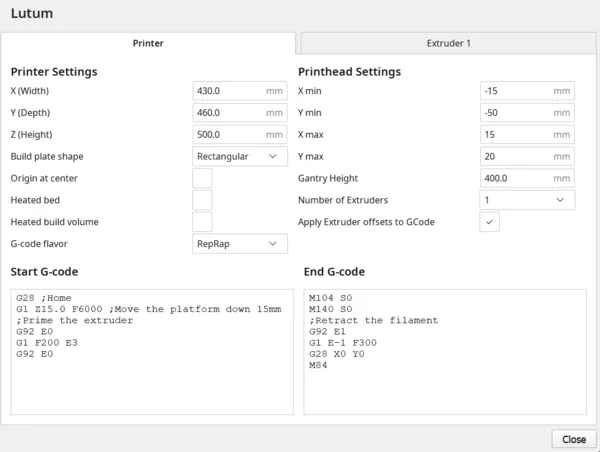
More printer profiles to come, but can also be set up manually by defining size of build plate (430 mm x 460 mm x 500 mm), gcode flavour RepRap (instead of Marlin) and start and end gcode.
Start gcode
G28 ;Home
G1 Z15.0 F6000 ;Move the printhead up 15mm
;Prime the extruder
G92 E0
G1 F200 E3
G92 E0
End gcode
M104 S0
M140 S0
;Retract the filament
G92 E1
G1 E-1 F300
G28 X0 Y0
M84
Cura screenshot